The inspection platform that 200+ industrial coatings firms run their work on.
DocuPaint is the system of record for industrial coatings inspection. The documentation infrastructure for every protective coat applied to refinery tanks, pipelines, marine vessels, bridges, fireproofing, and the rest of the industrial world. Multi-year engagement. Built in production. Endorsed by AMPP. The work it represents is the deepest engagement we've ever done with a single industry.
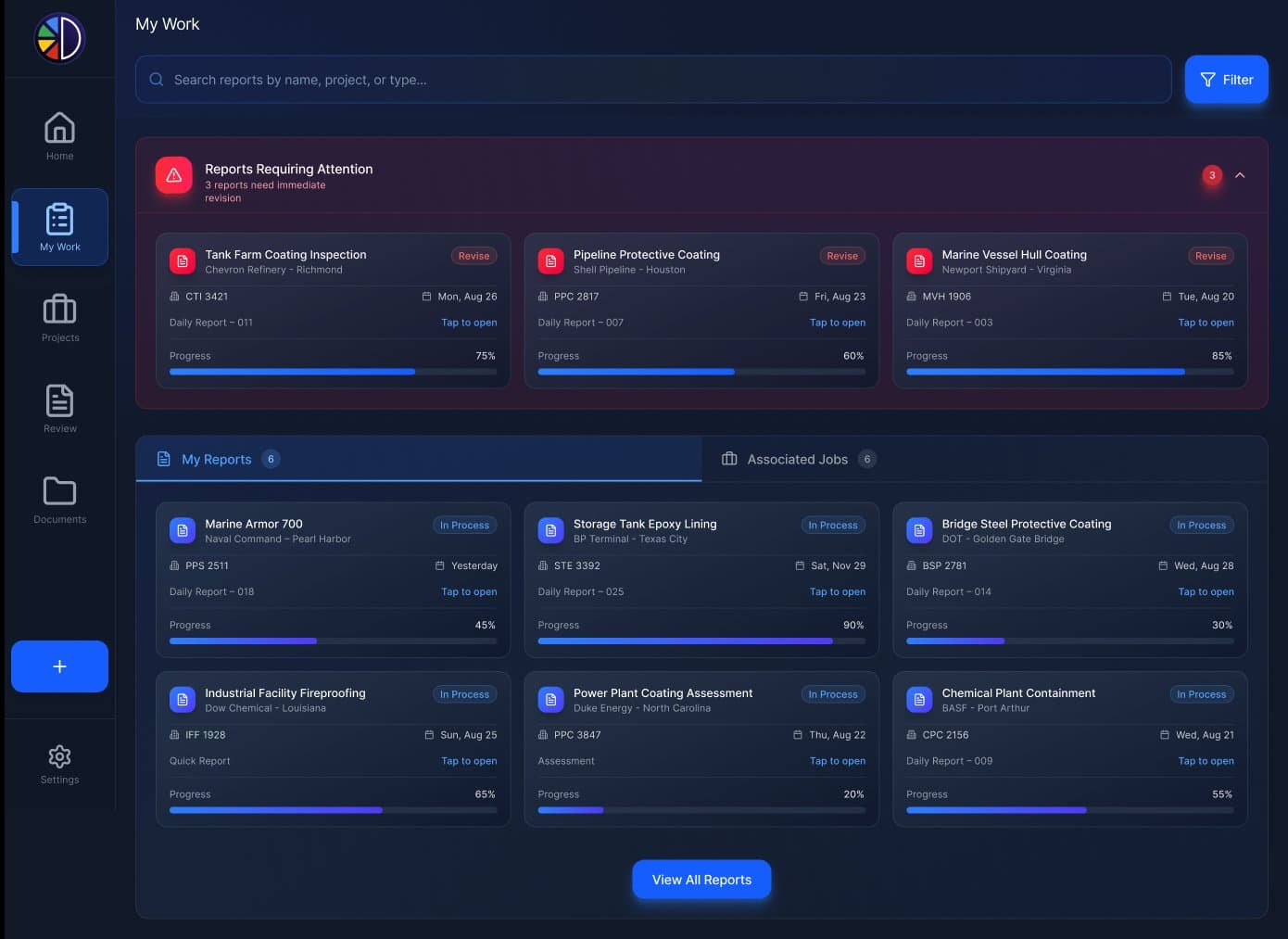
Industrial coatings is a high-stakes industry running on paper.
Every protective coating applied to a refinery tank, a pipeline, a bridge, a marine vessel, a chemical containment unit, or a fireproofed steel beam is documented to a standard. The standards aren't optional. They're how an asset owner proves the work was done correctly, how a contractor gets paid, how an inspector defends their certification, and how the asset itself stays serviceable for the next twenty years.
The documentation is dense, structured, and often legally consequential. Wet film thickness readings, dry film thickness readings, ambient temperature, surface temperature, dew point, relative humidity, surface profile, surface preparation standard, coating product, batch number, mixing ratio, application method, thickness per coat, total system thickness, photo evidence at each stage. For one tank. One report. A single industrial project might produce a thousand.
Until DocuPaint, almost all of this work was done on paper, then transcribed. Triplicate carbonless forms. Three-ring binders. Excel templates copied between firms. PDFs of scanned forms emailed at the end of the week. The information was correct, eventually, but the process leaked time, accuracy, and accountability at every step.
The opportunity wasn't to "digitize coatings inspection." It was to build the documentation system the standards already demanded, and let the field worker do their job in software instead of around it.
The work that lived before the first line of code.
DocuPaint works because of what came before development, not what came during it. The product holds up because we treated the domain itself as the build.
Field visits. We rode along with inspectors at refineries, marine yards, and pipeline rights-of-way. We watched them climb scaffolding with paper forms in their pocket and a clipboard tucked under their arm. We saw them try to write a thickness reading in 110-degree sun while wearing nitrile gloves. We measured how long a daily report actually takes to fill out at the end of a shift. And how often it gets done the next morning instead.
Standards study. We read AMPP, SSPC, NACE, ISO 8501, AVFAC, USACE, USN, and IMO documentation in the depth required to encode them — not summarize them — into structured workflows. We read JHA/JSA and AHA templates from three different agencies side-by-side until we understood why they look almost-but-not-quite alike. The product's accuracy depended on getting this part right.
Operator interviews. We talked to coatings inspectors at firms of every size. The one-truck independent, the regional inspection shop, the firms with offices in five states. We asked what kills their week. The answer was almost always the same: "writing the same thing five times in five places, and chasing other people for information that already exists."
The output of that work isn't visible in the product directly. It's invisible the way a foundation is invisible. Every screen, every field, every decision branch is shaped by it.
Four product zones. One coherent system.
DocuPaint runs as a multi-tenant web platform with native tablet and mobile companions. The four zones below cover the full work surface a coatings firm needs. From the moment a project is bid to the moment the closeout package is delivered. For shops already standardized on Procore, the system extends through our Procore integration layer — including a construction forms app pattern with the same offline-first, audit-trail-bearing engineering that runs DocuPaint.
Project & Job hierarchy
Projects (the asset owner's contract) contain Jobs (specific work scopes) which contain Reports (the inspection records). Site information, gate codes, security checkpoint requirements, point-of-contact roster, asset coordinates, attached procedures and MSDS sheets. All where the field worker actually needs them, on the same screen as the work itself.
Report engine
Daily Reports, Quick Reports, Assessments, Surveys, Audits, and the full Safety Report family (Safety Toolbox, JHA/JSA, AHA USN/AVFAC, AHA USACE, Confined Space Permit). Each report type is a configurable document with required and optional sections, structured field validation, photo-and-signature capture, and PDF rendering that survives a deposition.
Paint System spec builder
The wizard that defines what's being measured. Substrate (steel, concrete, galvanized, non-ferrous, wood, dry wall, composite), surface preparation standard with min/max profile in mils, the coating schedule (primer, intermediate, topcoats) with product names, types, and thickness ranges per layer. The spec the field reports get evaluated against. The source of truth for "is this coating in compliance?"
Shipping & Receiving + Documents
The infrastructure most coatings products forget. Material receipt logging, batch tracking, MSDS management, procedure libraries, site access maps, project-level document staging. The reason an inspector can pull up a coating's MSDS at a refinery gate without an internet connection. Every document tied to the project, the job, or both. Fetched once, referenced many times.
One job, three angles, all the context.
Every job in DocuPaint opens to the same three-tab modal. Job Details. The legal reality of the project: site address, gate code, point of contact, work description. Asset Location. The precise place the work happens, often hundreds of feet from where the project office sits, with directions ready. Notes & Files. The procedures, MSDS, site maps, and access information the inspector is required to review before starting. The modal exists because a coating inspector at a refinery gate can't toggle between four tabs to find a gate code.
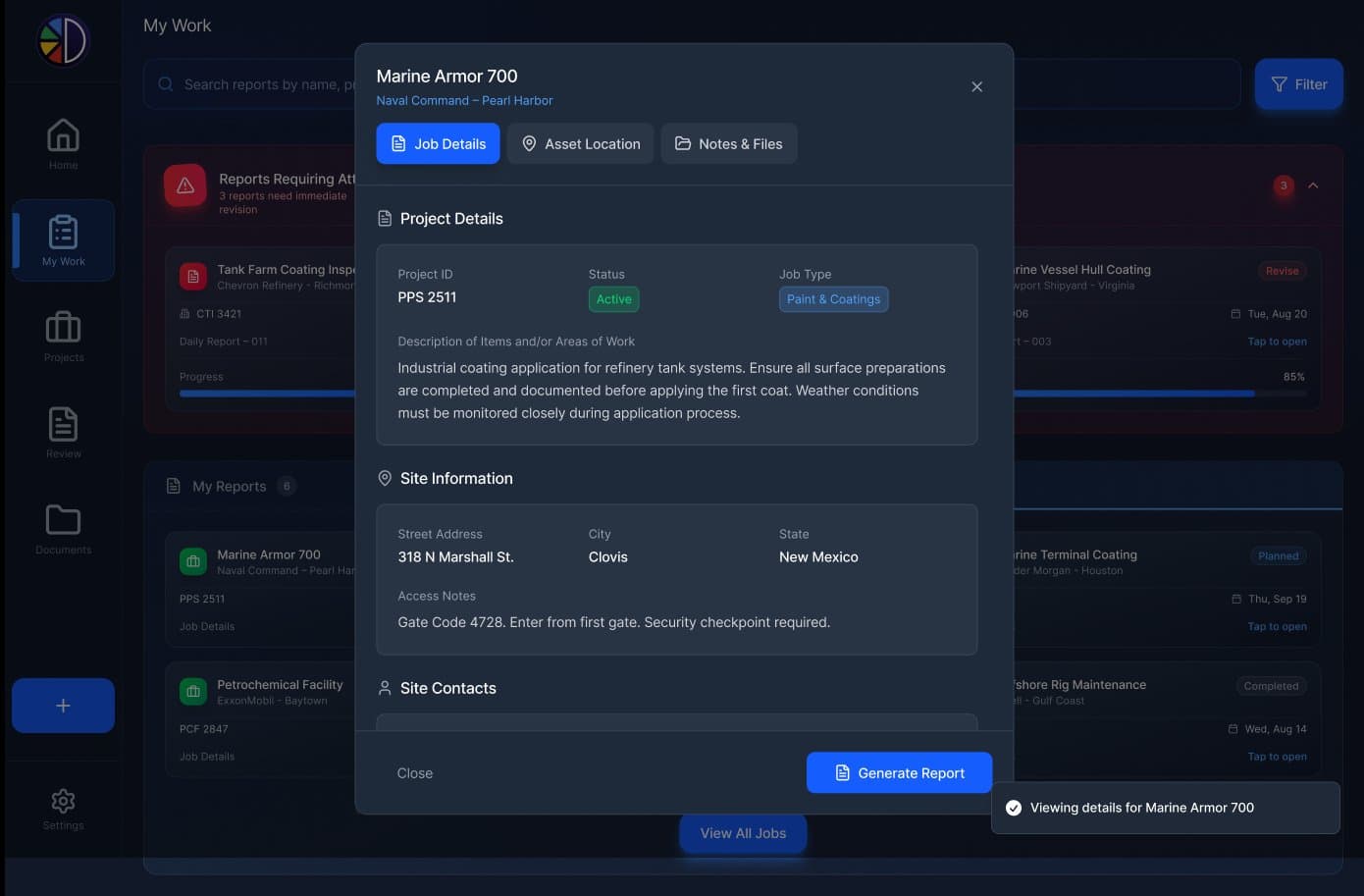
Project ID, active status, work description, site address, gate code, security requirements, on-site contacts. The information the inspector needs before they leave the truck.
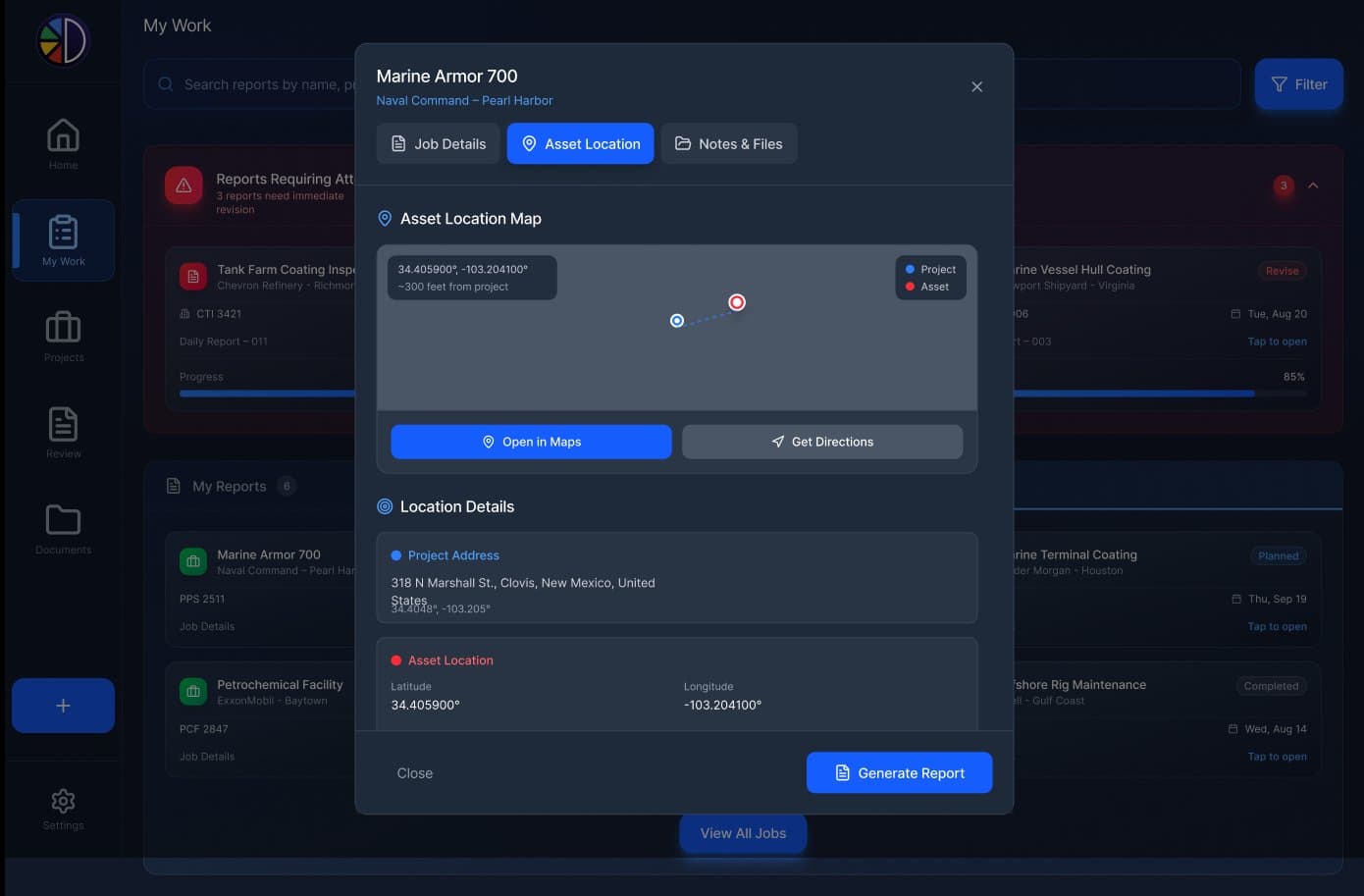
Project address vs. asset coordinates. Often hundreds of feet apart at a large facility. Open-in-Maps and Get-Directions handed off to the device's native nav app.
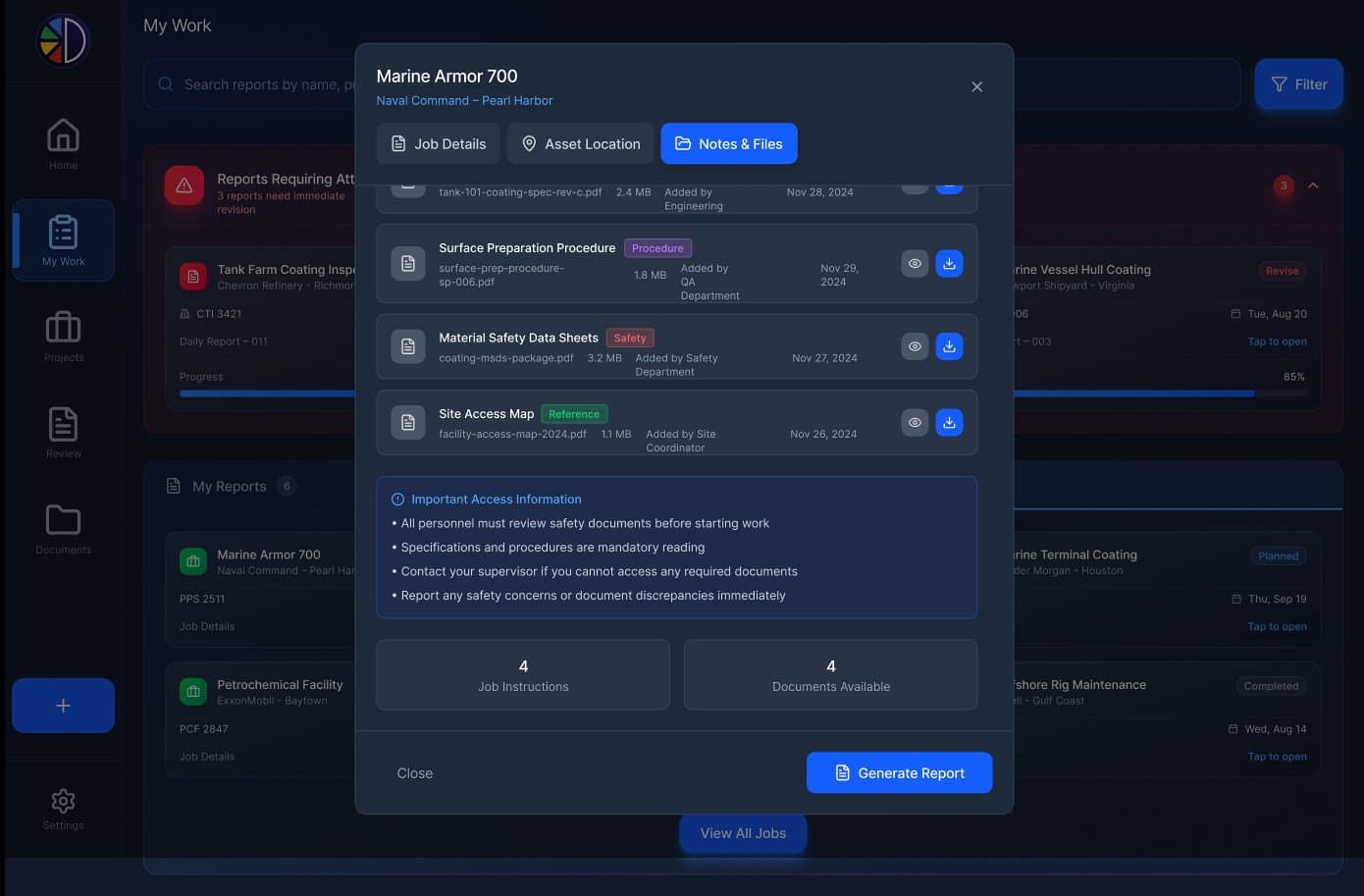
The procedures, MSDS, and site access maps required reading before work starts. Tagged, dated, attributed. Available offline at the gate.
The decisions the standards demanded.
Most software products for industrial verticals fail in the same way. They make compromises that look reasonable to a designer and unworkable to a field worker. Five decisions did most of the heavy lifting on DocuPaint.
Required sections, not freeform forms.
A daily report has 7 required sections. A safety report has 5. An assessment has its own set. The product enforces what the standard requires. An inspector cannot submit a daily report missing Environmental Conditions, because the standard the inspection is documented against doesn't allow it.
Freeform forms would have been faster to ship and infinitely worse for the inspector. The rejection of a non-compliant report at the asset-owner level would land days later. The validation belongs at the keyboard, not the QA review.
Optional sections with time estimates.
Coating inspection isn't a single template. Some days you're measuring wet film thickness. Some days you're doing adhesion testing. Some days you're documenting coating defects. The product surfaces optional sections for the inspector to add as the day demands. Each with a calibrated time estimate so the inspector can plan.
A daily report with Wet Film Thickness, Coating Defects, and Material Storage adds up to 65 minutes. The inspector sees that before they start. Software that respects the field worker's time gets used; software that doesn't gets bypassed.
Project, Job, Report. Three levels, not two.
The natural shape of coatings work is a three-level hierarchy. The asset owner contracts a Project. The project contains many Jobs (a specific tank, a specific pipeline run, a specific bridge span). Each job generates dozens of Reports over its life. Two-level products force inspectors to invent workarounds. Putting tank numbers in the project name, separating pipelines by hundredths of a digit.
Three levels match the work. The trade is one extra click on entry; the upside is a data structure that can answer "show me every Daily Report for Tank 47 across the last 18 months" without joining four spreadsheets.
Paint System spec as a wizard, not a form.
Defining a coating spec is conditional. Concrete needs different surface prep options than steel. Galvanized has different blast standards than non-ferrous. The number of coats depends on the system. A single long form would have been wrong on every other line. The five-step wizard — substrate, profile, surface prep, coating schedule, review — keeps the inspector inside the standard at every step.
The wizard generates a paint system that becomes the source of truth for every report measured against it. Reports validate against the spec, not just against themselves. Wet film thickness too low? The wizard's coating schedule says so.
Documents tied to projects, not folders.
Most document systems give you a folder tree and call it done. Coatings documentation isn't shaped that way. An MSDS for a primer is relevant to every job that uses that primer, across every project. A site access map is relevant to every job at that site. Procedures get reused across customers.
Documents in DocuPaint are tagged objects with relationships, not files in folders. An inspector at the gate searches for "Surface Prep Procedure" and gets the right document attached to this job. Not a buried PDF six folders deep.
Pick the report. Pick the sections. Start.
The home dashboard is the inspector's command center. Quick Report, Daily Reports, Assessment / Survey, Audits, the Safety family. Each one opens a configuration panel that surfaces the required sections (the standard's minimum) and the optional ones (everything the inspector might want to capture today). Time estimates are per section; the running total tells the inspector how long the day's work will take. The product is opinionated by design. It knows what the standard expects and asks the inspector only what the standard leaves to judgment.
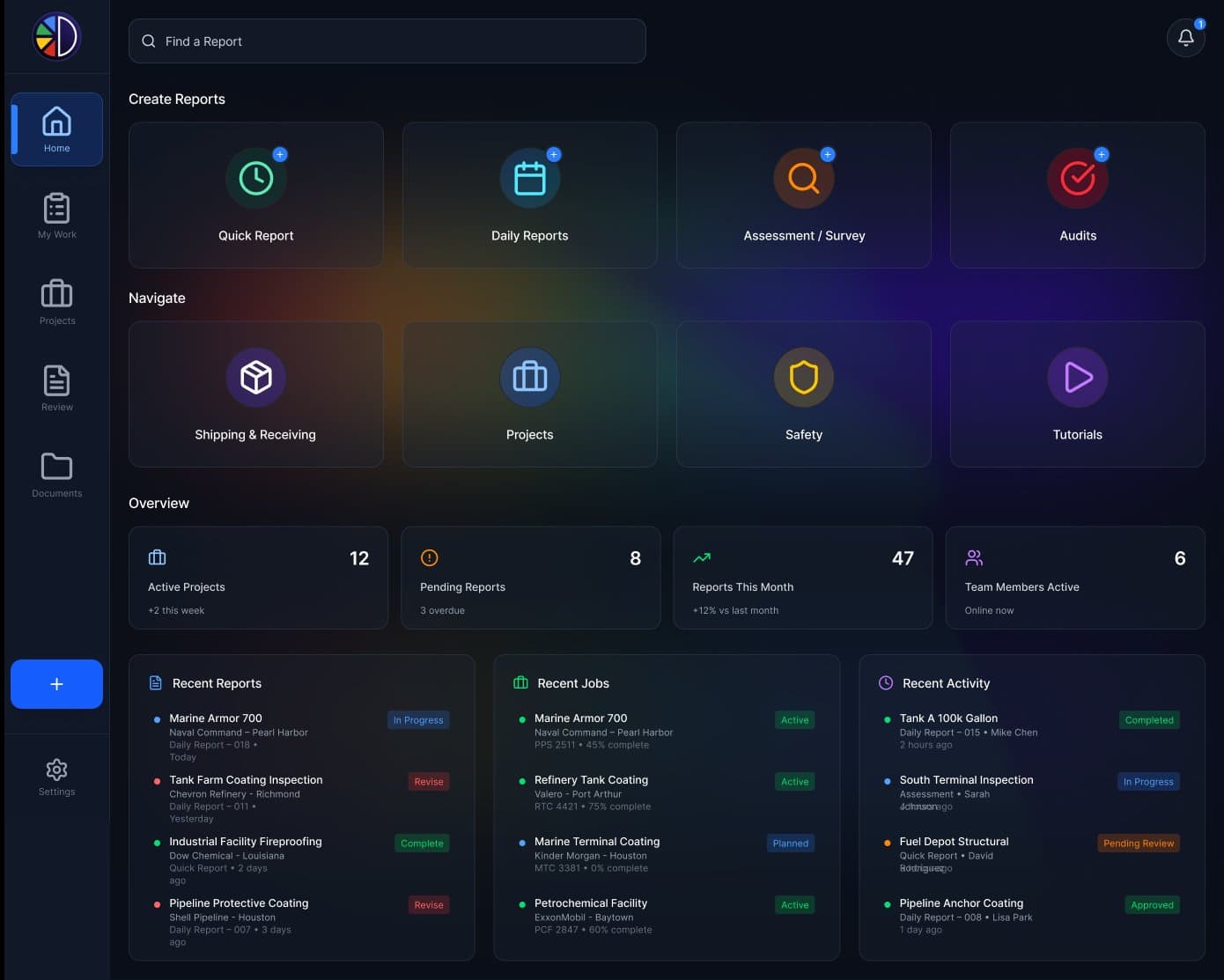
Create-report shortcuts up top, navigation tiles below. Active projects, pending reports, monthly throughput, team activity. All visible at a glance.
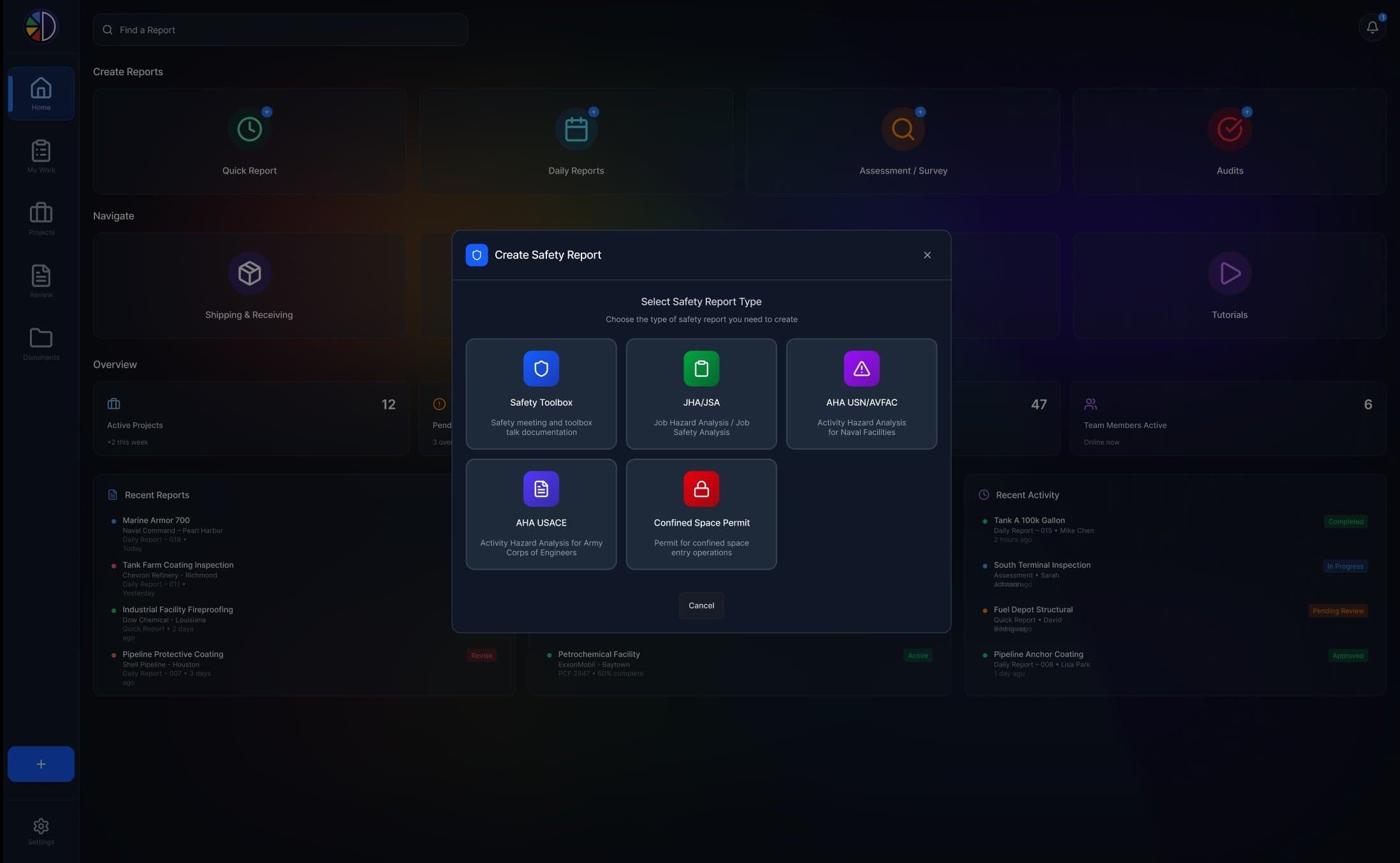
JHA/JSA, AHA USN/AVFAC, AHA USACE, Safety Toolbox, Confined Space Permit. Each renders to the agency's accepted format. The inspector picks the one their job requires.
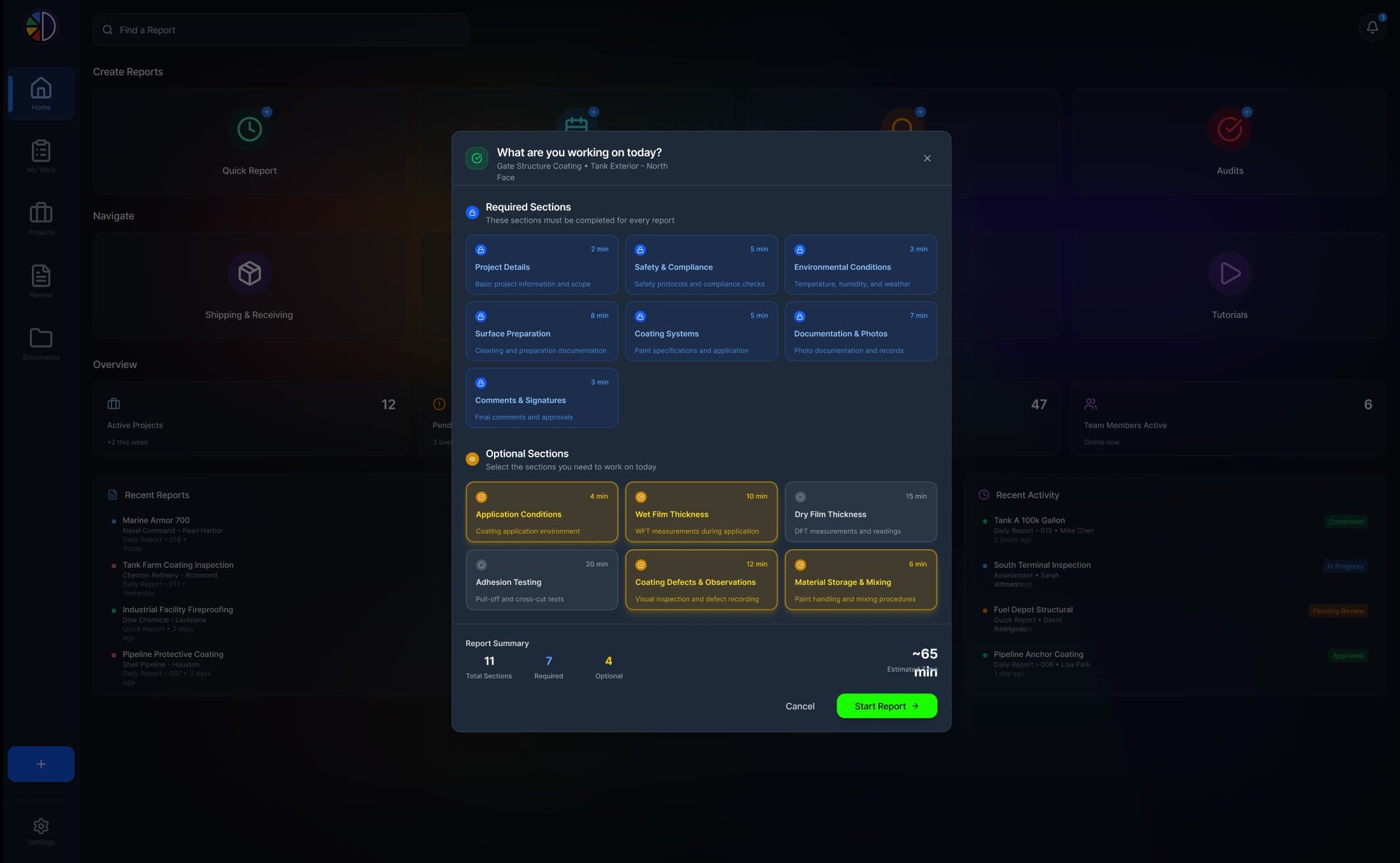
Required sections on top, locked. Optional sections below, opt-in. Time estimate per section, running total at the bottom. The screen is the design system's clearest expression of the product's posture: we know the standard, we respect your time, we let you decide what today's work needs.
The standards aren't compliance theater. They're the product.
DocuPaint's defensibility lives in its standards literacy. Every report type, every required field, every validation rule traces back to a written standard issued by a body the industry already trusts. The grid below names the ones DocuPaint encodes today. The list isn't exhaustive. It's the surface area visible in the product.
The Paint System wizard. Five steps, one source of truth.
A paint system in DocuPaint is the structured definition of a coating job. The substrate, the surface prep standard, the surface profile range, the coating schedule (primer, intermediate, topcoats with thickness ranges in mils), and the final review. Once it's built, every report measured against it validates automatically. Wet film thickness on the second coat below the spec? The wizard says so. Surface prep below the standard? Same.
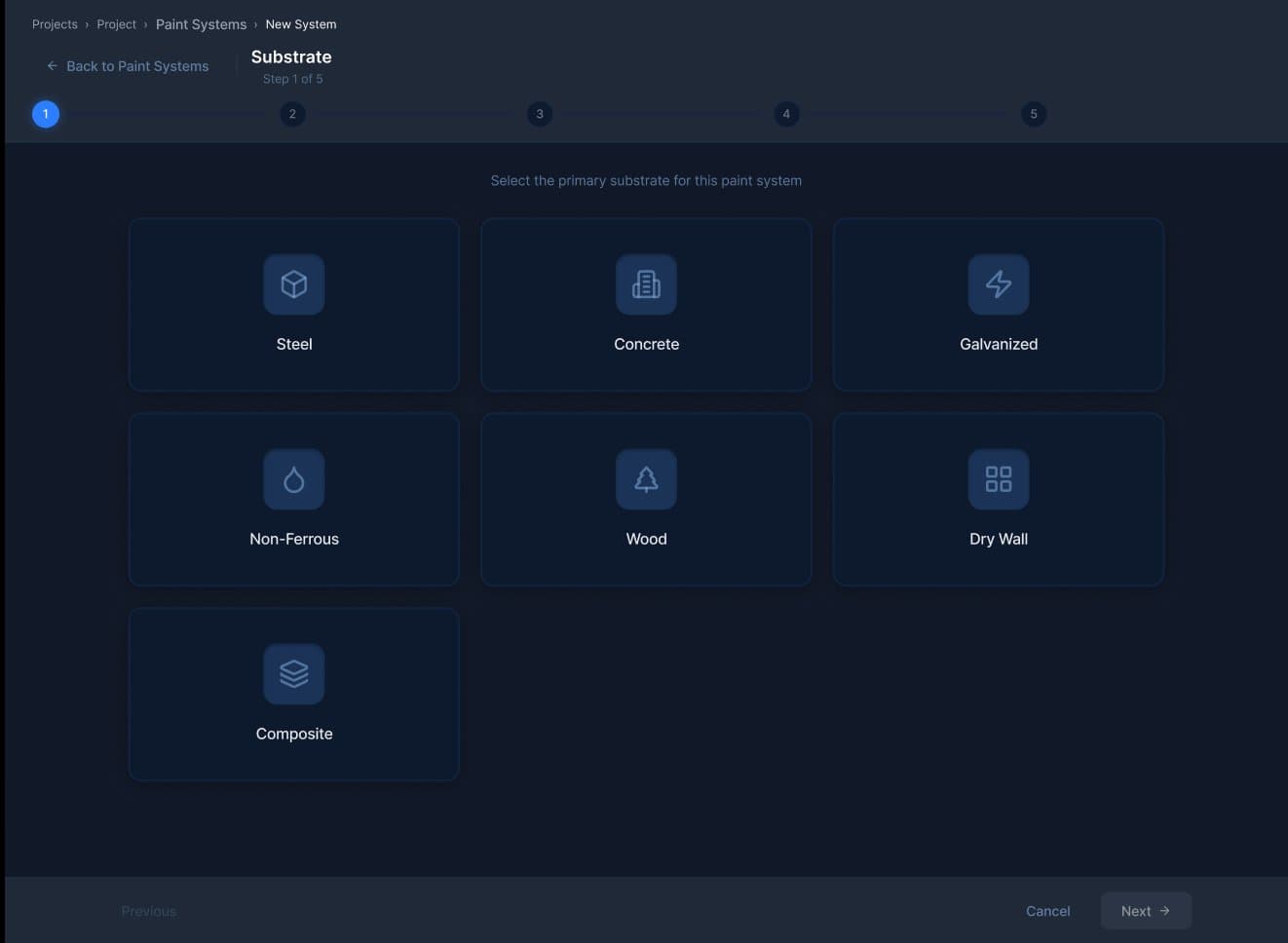
Steel, concrete, galvanized, non-ferrous, wood, dry wall, composite. The substrate decides what the next four steps look like.
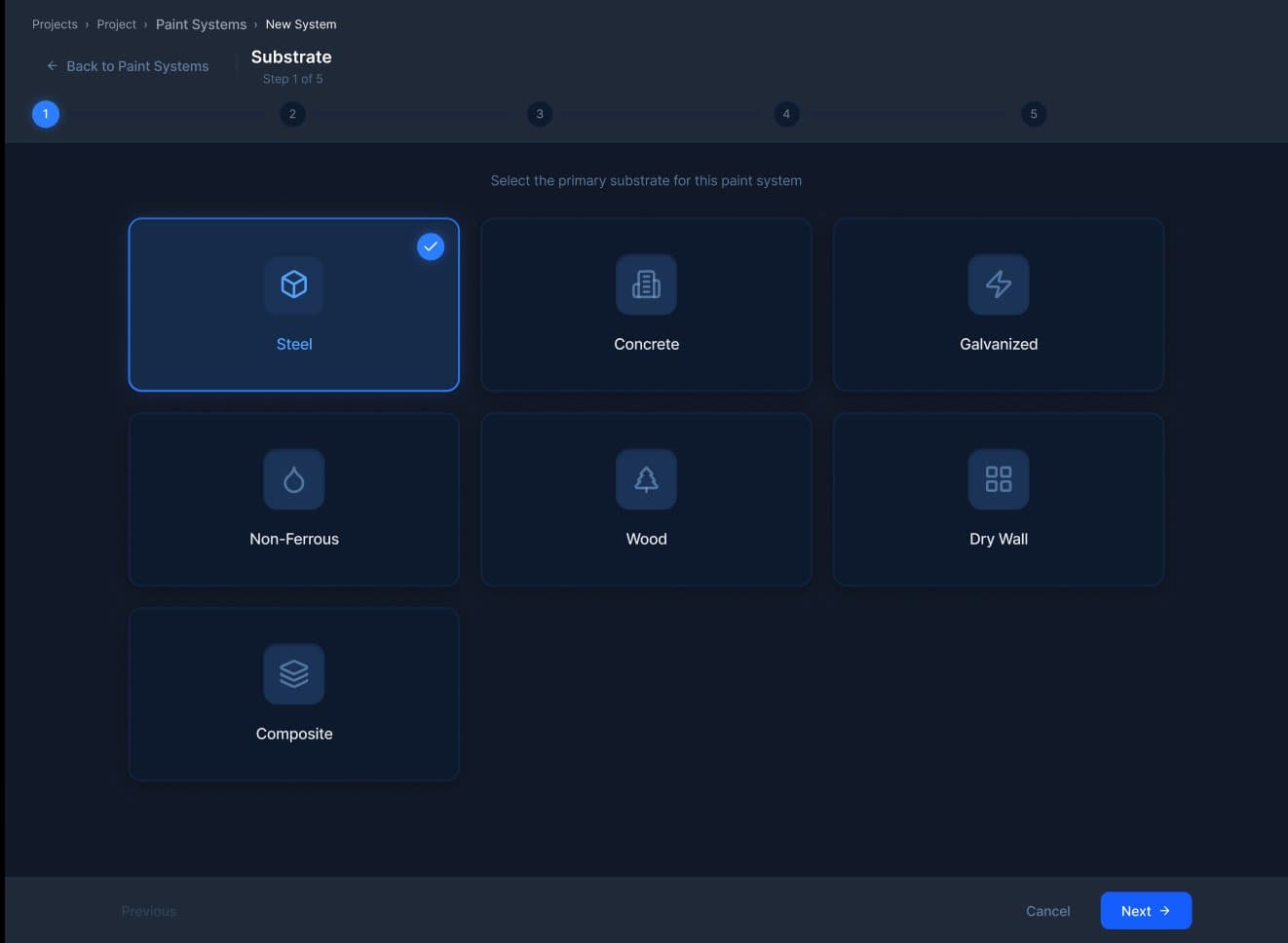
A clear primary action. Steel is the most common substrate in industrial coatings. The wizard shape stays consistent regardless of choice.
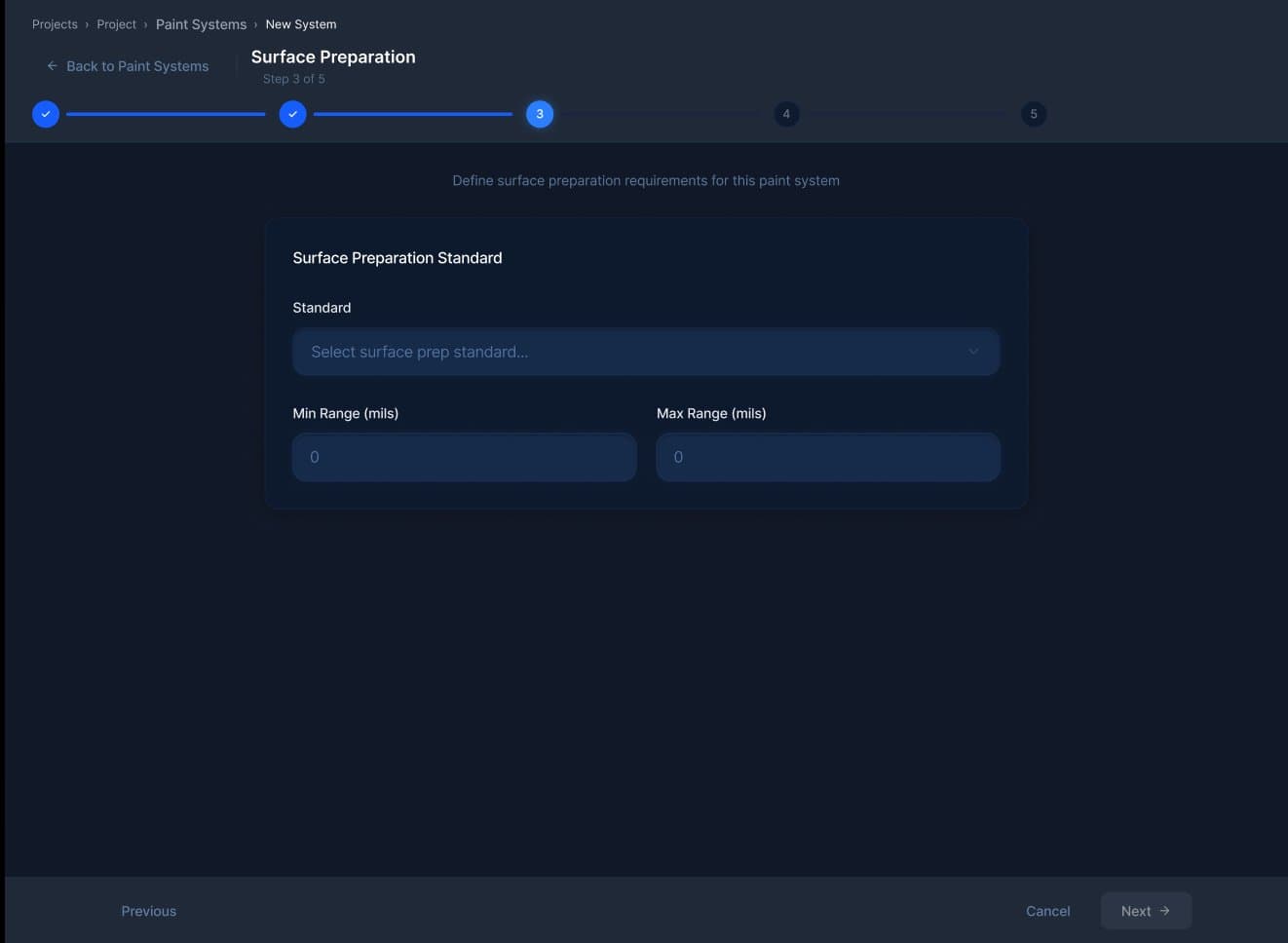
Standard (SP-6, SP-10, etc.), min and max range in mils. The numerical spec the field reports get measured against.
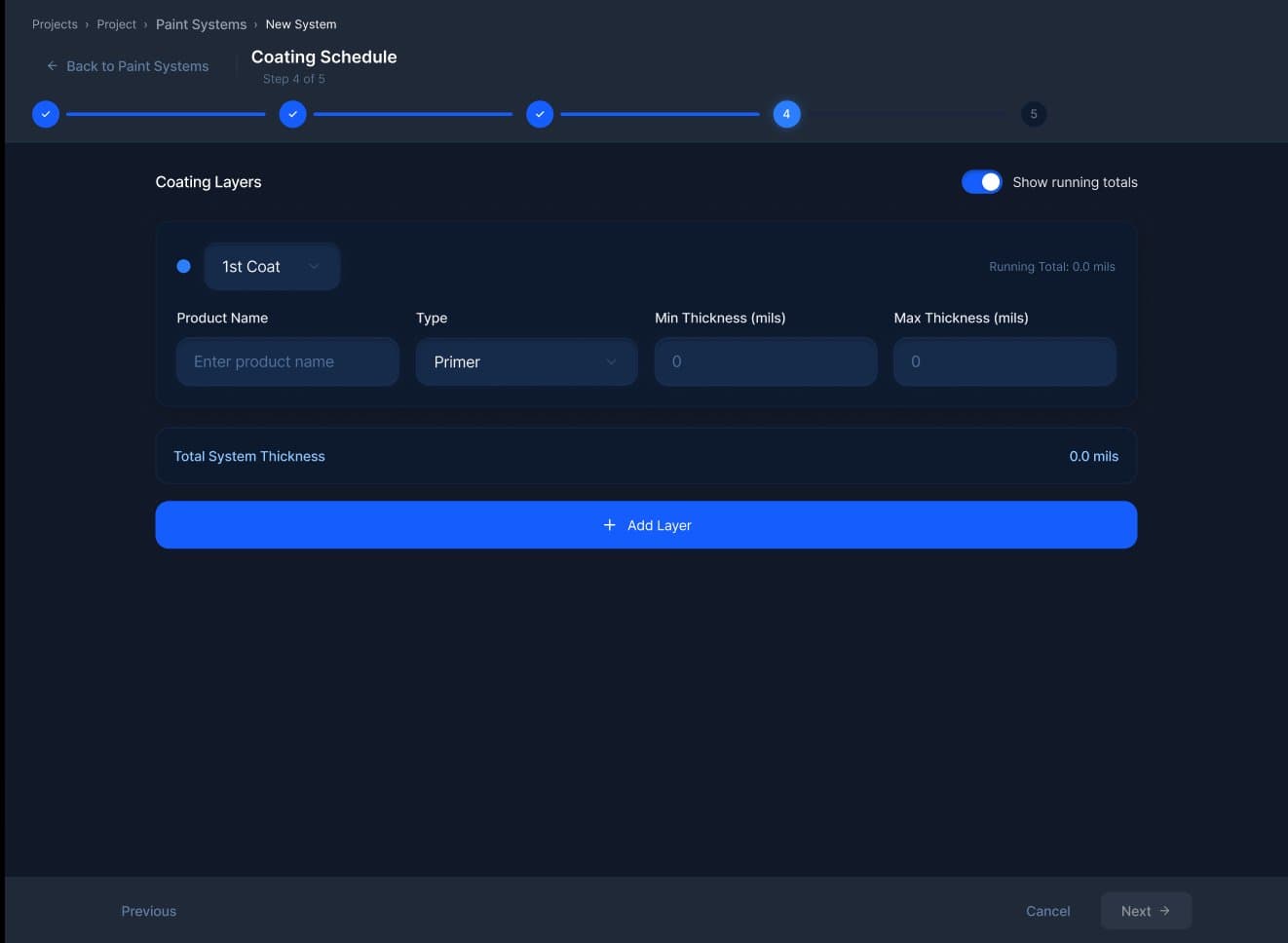
Primer, intermediate, topcoats. Product name, coating type, min/max thickness in mils. Running total of system thickness updates as layers are added.
What it takes to serve 200+ inspection firms.
An inspection product that works for one firm is a different system than one that works for two hundred. Every assumption that's safe at one tenant becomes a bug at fifty. The scale work is the part of the engagement that's invisible to the field user and load-bearing for the business.
Multi-tenant data isolation done correctly. Per-firm branding so the asset-owner-facing PDF reads as the firm's, not as DocuPaint's. Role-based permissions across owner, project manager, inspector, and reviewer roles. Document storage sized for binders' worth of MSDS sheets per project. Photo capture and storage that survives a marine environment. Offline-aware tablet companions that sync when connectivity returns. None of that is a feature. It's the cost of being a system of record.
Operational depth is the only durable moat an industrial software product has.
DocuPaint shipped its first release years ago. AMPP endorsement followed. The 200+ organization mark followed that. Every step required something different, but the foundation that made each step possible was the same: we treated the coatings industry as the work, and the software as the artifact.
That's the engagement model we keep coming back to. Industries that run on standards, on phone calls, on field photos, on triplicate forms, on the institutional memory of a single fifty-year-old superintendent. Coatings. Construction. Logistics. Industrial services. Field operations. The buyer is the same: an operator who's tired of software that wasn't built for them.
DocuPaint is the proof we know how to build for that buyer. It's also the proof of how long the work takes when it's done right.