The full operations system for a freight brokerage.
A freight brokerage runs on three separate systems most days. A load board, an accounting tool, and a phone. LoadQuest replaced all three. Dispatch, carrier management, accounting, AR/AP, EFS spend tracking, and a driver-facing mobile app. Built as one platform, in production for years.
A freight brokerage is three businesses stapled together.
A small or mid-size freight brokerage runs operations, accounting, and a customer service desk at the same time. Operations finds loads, calls carriers, tracks trucks, and handles exceptions. Accounting bills customers, pays drivers, manages credit, and reconciles fuel-card spend. Customer service answers the phone when something is on fire.
Most brokerages run all three on different software. A load board for dispatch. QuickBooks or Bill.com for accounting. A spreadsheet for credit limits. A phone log on paper. The real work is the friction between the three. Every load is touched by every system, and nothing automatically tells the others when something changes.
LoadQuest exists because that friction is the brokerage's actual cost structure. The goal wasn't to be a better load board. It was to be the one place where dispatch, accounting, carrier management, and driver communication all live on the same data.
The product had to be credible to the dispatcher and the controller in the same week. Two people who normally disagree about which numbers matter.
One platform. Eight product zones.
LoadQuest is a multi-tenant web application with a companion mobile app for drivers. The eight zones below run against a shared data model. Change a load's status anywhere and every other zone sees the change immediately.
Load Board & Dispatch
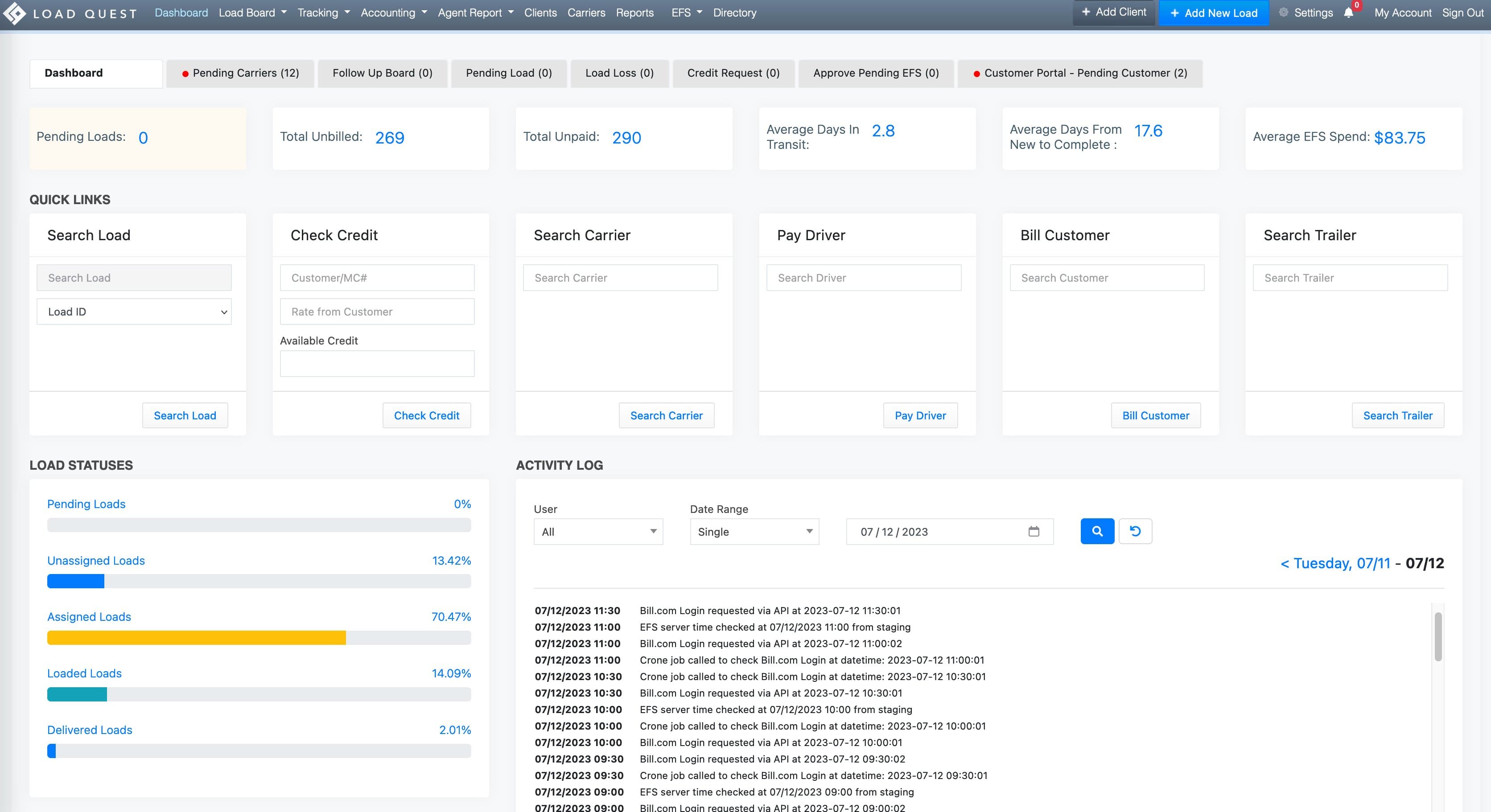
The dispatcher's primary surface. Pending loads, follow-up board, pending carriers, load loss tracking, customer portal queue. Load statuses (pending → unassigned → assigned → loaded → delivered) update in real time. Quick-action panels on every screen for searching loads, carriers, drivers, trailers, and customer credit without context-switching.
Carrier & Driver Directory
The roster of every carrier and every driver the brokerage works with. MC numbers, insurance certificates, equipment specs, lane preferences, payment history. The directory feeds the dispatch flow. When a load needs a carrier, the dispatcher searches against the carriers most likely to take it.
Accounting · AR/AP · EFS
Customer billing, carrier payment, credit limits, fuel-card spend tracking, invoice generation, statement reconciliation. Every transaction sits on the same load record. The dispatcher sees the same source data the controller is reconciling. Average EFS spend, total unbilled, total unpaid, average days in transit, and average days from new-to-complete are first-class metrics on the home screen.
Tracking & Load Verification
Live in-transit tracking, milestone confirmations, load verification at pickup and delivery. The dashboard's load-status breakdown (pending, unassigned, assigned, loaded, delivered) is the rolled-up output. The verification step is where disputes get prevented. Confirmed pickup, confirmed delivery, confirmed paperwork.
Reports & Activity Log
Operational reports for the dispatcher, financial reports for the controller, agent reports for the brokerage's outside agents. The activity log on the dashboard is the audit trail: every API call, every Bill.com login, every cron job execution timestamped and visible. The kind of operational transparency a brokerage needs when something is wrong.
Driver Mobile App
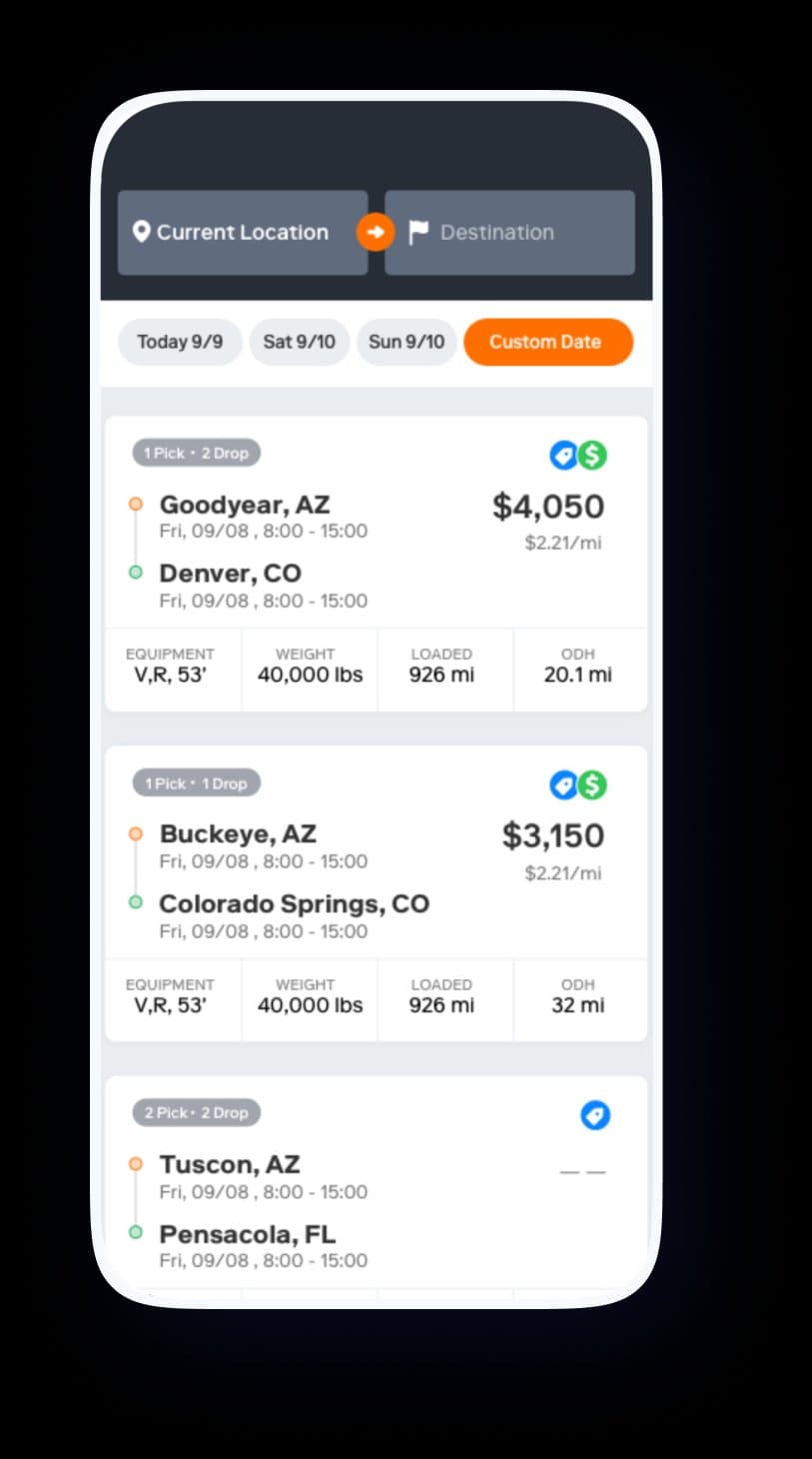
The companion app for drivers. Available loads near current location, by date, with rate, mileage, equipment, and weight visible per row. The driver's primary surface is intentionally minimal. Just enough to find a load, accept it, and start moving. The complex back-office work happens on the broker side; the driver gets exactly what they need on the road.
Rate, route, equipment. Nothing else.
Drivers don't want a dashboard. They want to know where the next load is, what it pays, what equipment it needs, and when it picks up. The mobile app strips LoadQuest's broker complexity down to the four facts that matter on a steering wheel.
Every load card shows origin and destination, pickup and dropoff windows, equipment specs, weight, loaded miles, and out-of-distance haul. The rate is the largest text on the card. Drivers compare offers fast and the app respects that. The pick/drop badge ("1 Pick · 2 Drop") tells the driver in one glance whether the load is simple or split.
The decisions two-system thinking demands.
A platform that serves brokers and drivers can't just be one product with two skins. Three decisions did most of the structural work.
Same data, two surfaces.
Broker and driver views are different products with the same source of truth. A load is a load on both sides. The broker sees billing status, EFS spend, customer credit, dispatcher notes. The driver sees rate, route, equipment, pickup time. Both queries hit the same row.
The alternative — separate products with sync logic between them — would have introduced exactly the kind of friction LoadQuest exists to eliminate.
Accounting on the home screen, not three clicks away.
Pending Loads, Total Unbilled, Total Unpaid, Average Days in Transit, Average Days From New to Complete, Average EFS Spend: all six are first-class metrics on the broker dashboard. The dispatcher sees the controller's numbers every morning.
Most freight platforms hide accounting behind a separate menu. LoadQuest treats it as part of operations because cash position drives every dispatch decision. Which loads to chase, which carriers to extend, which customers to advance against.
The activity log is the audit trail.
Every API call, every Bill.com login attempt, every cron job execution lives in a filterable, timestamped log on the dashboard. When integrations fail — and integrations always fail — the brokerage doesn't have to call us to ask why a payment didn't post.
The log is the operational transparency that lets a brokerage trust the system with their accounting. No black boxes. No "we'll look into it." The receipts are visible.
The driver app is intentionally minimal.
The driver mobile app could have been a smaller version of the broker dashboard. We rejected that. A driver in a cab at 4am needs to find the next load and accept it. Not navigate a menu tree. The app has one primary screen: available loads, sorted by relevance.
The trade is that the driver-side experience can't expand into broker-style functionality without changing shape. That's the right trade. Drivers and brokers are not the same buyer.
Operations software wins by absorbing the workflows the business already has.
LoadQuest works because we didn't try to teach a freight brokerage how to run a freight brokerage. We watched dispatchers work. We sat with controllers reconciling Bill.com. We rode along with drivers. Then we built software that fit the work the brokerage was already doing. Only faster, only with the data on the same page, only with the audit trail visible.
The pattern shows up across our work. Coatings inspectors at refineries. Cattlemen at sale barns. Dispatchers at a brokerage. The buyer is always the same. An operator who's tired of three different tools that don't talk to each other, and who wants software that respects the way they already work.
That's the engagement model we keep coming back to: operational software for industries that run on phone calls, dispatch boards, and the institutional memory of a fifty-year-old superintendent.